
Launching a Branded CustomGPT Chatbot Portal with Secure OpenAI Assistants API
Built and deployed a responsive, branded chat interface connected to a proprietary CustomGPT via the OpenAI Assistants API—without transferring sensitive training data to developers. Productionized the backend on a VPS with auto-restart to keep the bot reliably online.
Problem Statement
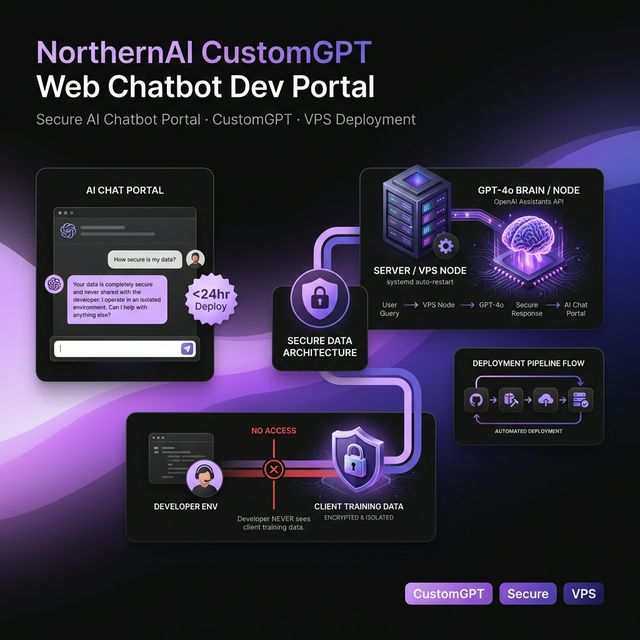
The client had a proprietary, document-trained CustomGPT and an API key, but their dev server only hosted a plain test page. They needed a polished, on-brand chatbot experience that could be embedded on a subdomain, while also protecting sensitive customer-owned training data (could not be shared with the developer).
Our Approach
Architected a lightweight web chat UI on dev.northernai.ca and connected it to an OpenAI Assistant (API-accessible equivalent of a CustomGPT). Implemented a small Python service to broker requests to the Assistants API and deployed it on the client’s VPS under cPanel, then hardened runtime reliability using a managed process + systemd so the chatbot service automatically restarts on failure or reboot.
Proprietary-document Q&A via OpenAI Assistants (File Search)
Challenges We Solved
Secure Assistant creation without exposing proprietary training data
Client could not share CustomGPT instructions/documents due to strict confidentiality (third-party customer-owned content). Direct recreation by the developer would require access to sensitive files.
Implemented a workflow where the client created/configured the Assistant and uploaded files inside their own OpenAI account, then shared only the Assistant ID and API key. This preserved data boundaries while enabling full API integration.
Token pressure and retrieval tuning in document-grounded chat
Client observed model/token issues during early testing and the assistant was returning overly verbose answers with unnecessary source-style references. Default retrieval size risked noisy context injection.
Validated model selection (GPT-4o) and tuned retrieval by limiting maximum results to 5, improving response focus and reducing excess context. Advised updating assistant instructions to suppress file/source callouts in user-facing answers.
Deploying behind cPanel pathing and permissions constraints
Initial deployment faced bugs related to cPanel directory structure and access constraints; needed correct document root and environment to serve the app reliably under a subdomain.
Identified the correct deployment target (/home/devnorthernai/public_html), aligned files accordingly, and completed deployment to the live dev subdomain.
Productionizing the Python service for reliability
A chatbot bridge service must stay online; ad-hoc execution risks downtime on crashes or server reboot.
Created a process manager and configured a systemd unit to keep the Python app running continuously with automatic start on boot and restart on failure.
Live incident recovery months after launch
After months of operation, the portal began throwing errors; root cause unclear (server instability).
Re-accessed the environment (cPanel + OpenAI dashboard verification), checked Assistant status, and restored functionality; confirmed the app working again for the client.
Project Timeline
Discovery
Reviewed the existing dev endpoint (single test page) and clarified constraints: connect to a custom-trained GPT experience via API while keeping proprietary documents private. Confirmed hosting environment (VPS with cPanel) and brand source (northernai.ca color palette).
Build
Designed and implemented a clean, branded, mobile-responsive chat UI. Guided the client through creating the OpenAI Assistant in their own account, integrated using the Assistant ID/API key, tested against known Q&A, and tuned retrieval settings for relevance.
Launch
Deployed to the dev subdomain document root on the VPS, then productionized the Python backend using systemd for auto-restart. Provided operational guidance (instruction tweaks, ongoing file updates) and later performed incident recovery to restore service.
Ready to Build Something Similar?
Let's discuss how we can help transform your business with AI.
Start Your Project